
ChatGPT for SEO: Practical Workflows, Prompts and Checks

How to use ChatGPT for SEO responsibly

Human and mechanical hands collaborate on a structured document outline.

ChatGPT can help with SEO research, outlines, keyword grouping and draft revisions. It does not replace source checking, search-intent analysis or editorial judgment.

This guide keeps the practical workflows from the original article while correcting outdated model comparisons and prompting advice. Existing screenshots and videos are historical examples; they are not a walkthrough of the current interface.

Start with one real page and a clearly defined task. Keep confidential customer information, credentials and unpublished business data out of prompts unless your organization has approved the tool and its data-handling settings.

Open ChatGPT (opens in a new tab)

What's the difference between GPT-3 and ChatGPT?

ChatGPT is a conversational product. GPT-3 is an earlier language-model family. Comparing the product directly with a single historical model confuses the interface with the underlying technology.

There is no valid general rule that ChatGPT is a 1.5-billion-parameter model or that GPT-3 is therefore more powerful. Capabilities, limits and access depend on the model and tools available in the product you are using. Check the model information shown in your account rather than inferring it from the ChatGPT brand.

For the historical model, see our GPT-3 guide. The image below is a historical, speculative hype-cycle illustration, not a measured timeline, model catalogue or evidence of Google penalties. Its predictions should not be read as verified events.

ChatGPT - Guides for SEO

Guide 1: How to write a blog post using ChatGPT?

1. Define intent before asking for an outline. Identify the reader, their question, the page type and the useful information your business can contribute. Review actual search results yourself; a generated outline is not evidence of search demand.

Example prompt: “Create an outline for [topic] for [audience]. The reader needs to [task]. Use these original notes: [notes]. Separate supported points from questions requiring research. Do not invent facts, sources or customer examples.”

2. Draft one section at a time. Supply verified notes and source references. Ask for a direct answer followed by explanation and a practical example. Mark hypothetical examples clearly.

3. Edit for substance. Check each factual claim against its source, remove repetition, add first-hand observations where you genuinely have them, and make headings describe the section accurately.

4. Verify before publishing. Check links, attribution, spelling, accessibility, title and description. Preview mobile formatting. A completed draft is not a completed article.

Build a source-backed brief instead of copying competitors

Use competitor pages to understand questions and coverage gaps, not as text to copy and disguise. Research primary sources, record the claims they support, and add your own relevant experience or analysis. Respect copyright and source terms.

Example prompt: “Using only these research notes and source URLs, draft a section answering [question]. Cite the source associated with each factual claim. Mark missing evidence as [verification needed]. Do not imitate another article’s wording.”

Open every cited source yourself: a plausible-looking citation can be wrong. Choose length to answer the question, not to hit an arbitrary word count. Never present generated examples as measured results.

Guide 2: How to create topics and categories using the AI chat?

There is no universal 90-word limit for ChatGPT prompts. Input limits depend on the model, interface and conversation context. For reliable keyword work, use manageable batches and keep a master list outside the chat.

Grouped keyword tokens connect to documents examined with a magnifying glass beside a lock.

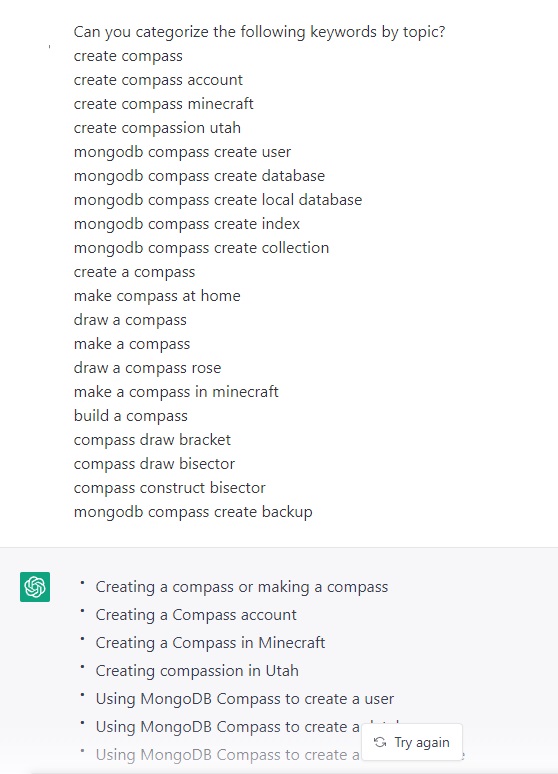
Example prompt: “Group these keywords by topic and likely search intent. Return columns: keyword, topic, intent, proposed page and uncertainty. Preserve every keyword exactly. Assign each once; flag ambiguous terms. Do not invent search volume: [keywords].”

These are proposed groups, not measured demand. Validate intent against search results and use Search Console or a keyword data source for actual metrics. The screenshot below illustrates the original workflow, not current interface behavior.
For a second batch, reuse the same category definitions so the groups remain consistent.

Follow-up prompt: “Use only these categories: [categories and definitions]. Assign each keyword below to one category or mark it ‘needs review’. Return the original keyword unchanged and explain uncertain assignments: [keywords].”

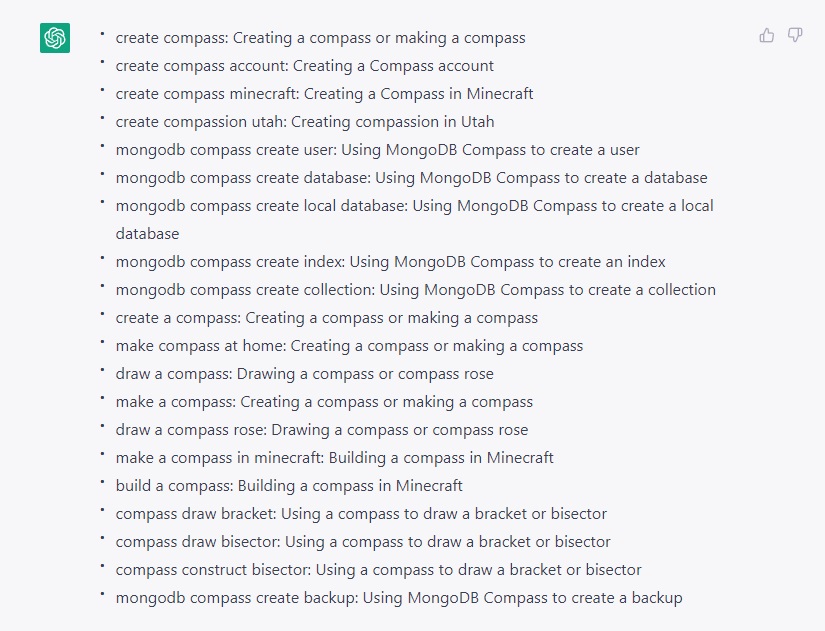
Compare output with your input list to detect missing or duplicated terms. Merge groups that serve the same intent instead of automatically creating a page for every variation. Review the historical example below as a starting point, not a taxonomy to copy unchanged.

How to evaluate ChatGPT output for SEO

The original page displayed anonymous, unsourced reactions with star ratings. Those ratings are not a verified product review and have been removed.

  • Accuracy: can you trace each important claim to a trustworthy source?
  • Original value: does the result include useful information beyond a generic summary?
  • Intent: does the page actually help the intended reader complete their task?
  • Safety: are private data, copyright and code-execution risks addressed?

Google vs ChatGPT

Google Search and ChatGPT serve overlapping but different tasks. Do not assume a conversational answer is complete, current or a substitute for opening the original source.

Google introduced rich snippets in May 2009, long before ChatGPT. They were not introduced as a response to ChatGPT.

Google’s guidance on generative AI content emphasizes accuracy, quality and relevance. Generating many pages without adding value may violate its scaled-content-abuse policy; using AI alone is not the same as a policy violation.

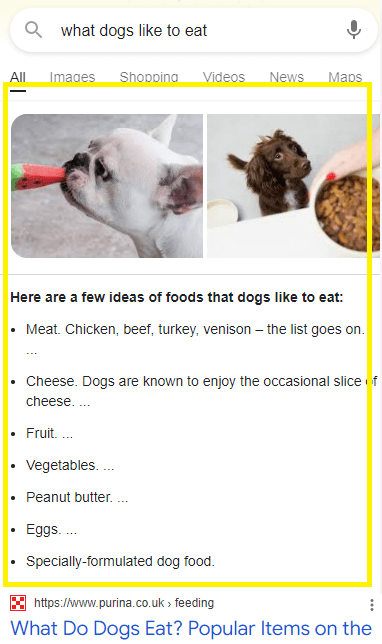
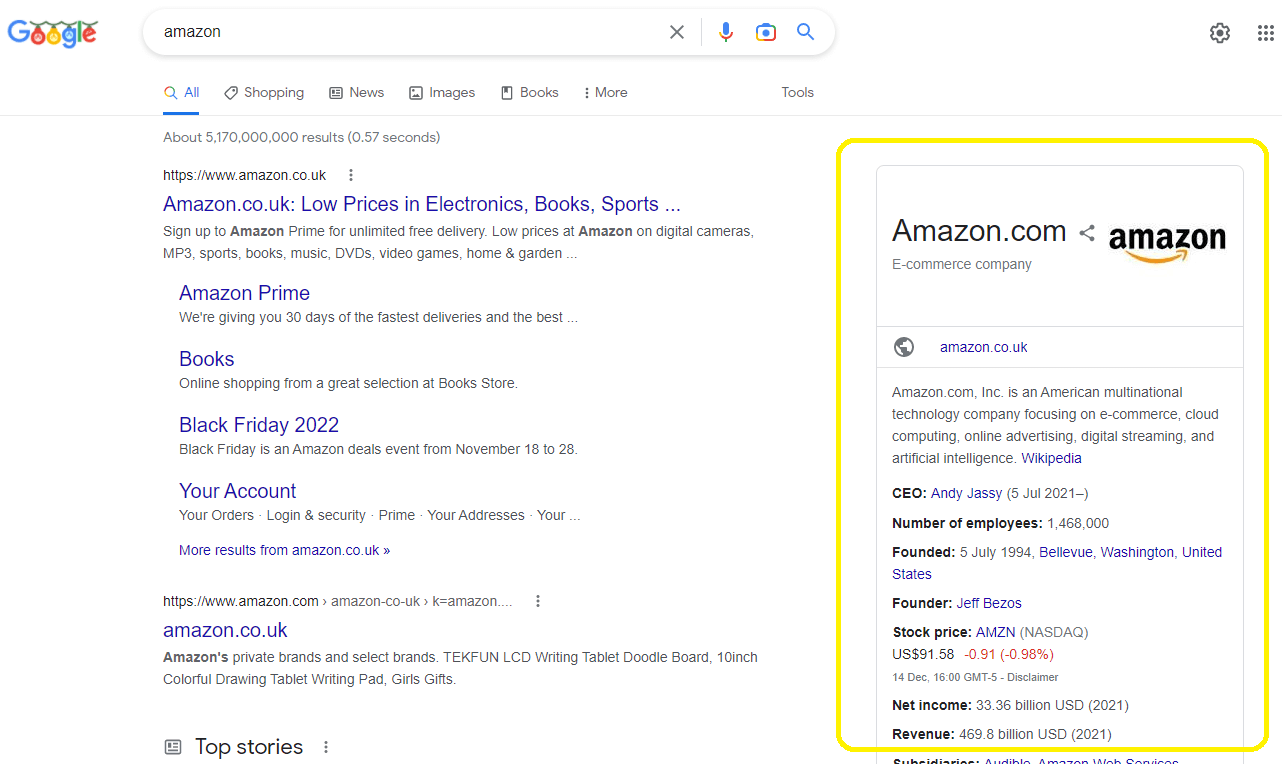
Do not promise that every site will lose organic traffic. Measure clicks, impressions, conversions and query patterns for your own pages. The screenshots below show historical search appearances, not guaranteed current results.

Historical example: the OpenAI Codex JavaScript sandbox

The original article included a demonstration of the OpenAI Codex JavaScript sandbox. The video below is retained as a historical example of natural-language-assisted coding, not an instruction to locate the same interface today.

For SEO scripts, start with a small read-only task such as checking a saved list of URLs or finding missing titles in an export. Review generated code and test it on sample data. Never run unreviewed scripts on a production site, expose API keys in prompts or allow a generated script to delete files without explicit safeguards.

Conclusions

Use ChatGPT to accelerate a defined part of your SEO workflow, not to manufacture expertise or publish unchecked pages at scale. Begin with a source-backed brief, preserve original value and keep a human responsible for factual accuracy.

Before publication: verify claims and citations, confirm the page answers the intended question, review internal links and metadata, preview on mobile, and record what you changed so you can evaluate it later.

Primary references: Google’s generative AI content guidance and Google’s original rich-snippets announcement.

The final video is retained from the original article as historical context. It is not evidence for the current availability or performance of a particular model.