
To measure AI referral traffic in GA4, start with the built-in AI Assistant channel. Use the regex below when you need a transparent, editable list of sources, a cross-check, or a custom comparison. Neither method measures all AI visibility: visits, citations and crawler requests are different signals.
Reviewed 15 October 2026 · This guide replaces the older broad keyword-matching regex. The copyable expressions contain no surrounding slash delimiters.

GA4 now has an AI Assistant channel
Google announced dedicated AI Assistant traffic measurement on 13 May 2026. Recognized assistant referrers receive the medium ai-assistant, the channel AI Assistant, and the campaign name (ai-assistant). See Google Analytics release notes.
The official channel definitions list sources such as ChatGPT, Gemini, Deepseek, Copilot and Grok. Google’s AI Overviews and AI Mode are excluded from AI Assistant: non-ad search-result visits from those Google experiences belong to Organic Search. Do not label every Google organic visit as an AI visit.
- Open the Traffic acquisition report under Acquisition; report collections can differ between properties.
- Choose the session-level default channel-group dimension, or a session primary channel-group dimension whose selected grouping is the default.
- Filter or compare AI Assistant. Add Session source / medium to inspect the actual sources behind it.
- Compare sessions, engaged sessions and meaningful key events. Keep the same date range and session-level scope.
Copyable regex for Session source / medium
Use this expression with Session source / medium → matches regex. The source must be one of the named domains; the medium may be ai-assistant, referral, or another reported value. Keep the anchors. Paste the expression itself — not /expression/, quotation marks or a JavaScript g flag.
(?i)^(?:(?:www\.)?chatgpt\.com|chat\.openai\.com|(?:www\.)?perplexity\.ai|(?:www\.)?claude\.ai|gemini\.google\.com|copilot\.microsoft\.com|(?:www\.)?grok\.com|(?:chat\.)?deepseek\.com|chat\.mistral\.ai)\s*/\s*[^/\r\n]+$
Important: the slash inside this expression matches the slash GA4 displays between source and medium. It is not a regex delimiter. (?i) makes matching case-insensitive. The explicit list intentionally avoids broad fragments such as .*gpt.*, .*pilot.* or .*ai$.
If your selected dimension is Session source only
Use the source-only version instead. A source/medium expression will not match a source-only value.
(?i)^(?:(?:www\.)?chatgpt\.com|chat\.openai\.com|(?:www\.)?perplexity\.ai|(?:www\.)?claude\.ai|gemini\.google\.com|copilot\.microsoft\.com|(?:www\.)?grok\.com|(?:chat\.)?deepseek\.com|chat\.mistral\.ai)$These are editable allowlists, not an exhaustive directory of assistants. Add a domain only after checking the actual source value and what service it represents. Do not automatically add bing.com or google.com: that would mix ordinary search traffic into this assistant-referral definition.
Test the filter before drawing conclusions
The following are synthetic test strings, not visits collected from a customer or this site. They illustrate the matching rule; a real property’s spelling, source and medium must be checked in its own report.
| Reported value | Source / medium regex | Why |
|---|---|---|
chatgpt.com / ai-assistant |
Match | Named domain, valid separator and medium |
perplexity.ai / referral |
Match | Same source definition, different medium |
gemini.google.com / ai-assistant |
Match | Specific assistant host |
chatgpt.com |
No match | Use the source-only regex for this dimension |
google / organic |
No match | Ordinary Google organic source is not isolated AI Assistant traffic |
trustpilot.com / referral |
No match | Contains “pilot”, but is not Copilot |
chatgpt.com.example.org / referral |
No match | A suffix does not make this a listed domain |
(direct) / (none) |
No match | No identifiable assistant source |
- Export or inspect the source/medium rows before applying the comparison.
- Apply the expression and check representative matches and exclusions.
- Compare against the AI Assistant channel using the same period and scope. Investigate differences; do not assume one total must equal the other.
- Record your regex version, date and domain additions. Do not add the channel total to the regex total — the two groups may overlap.
This is a report comparison or exploration filter, not a GA4 Admin data filter for deleting or excluding collected events. A reporting regex cannot reconstruct missing referrers.
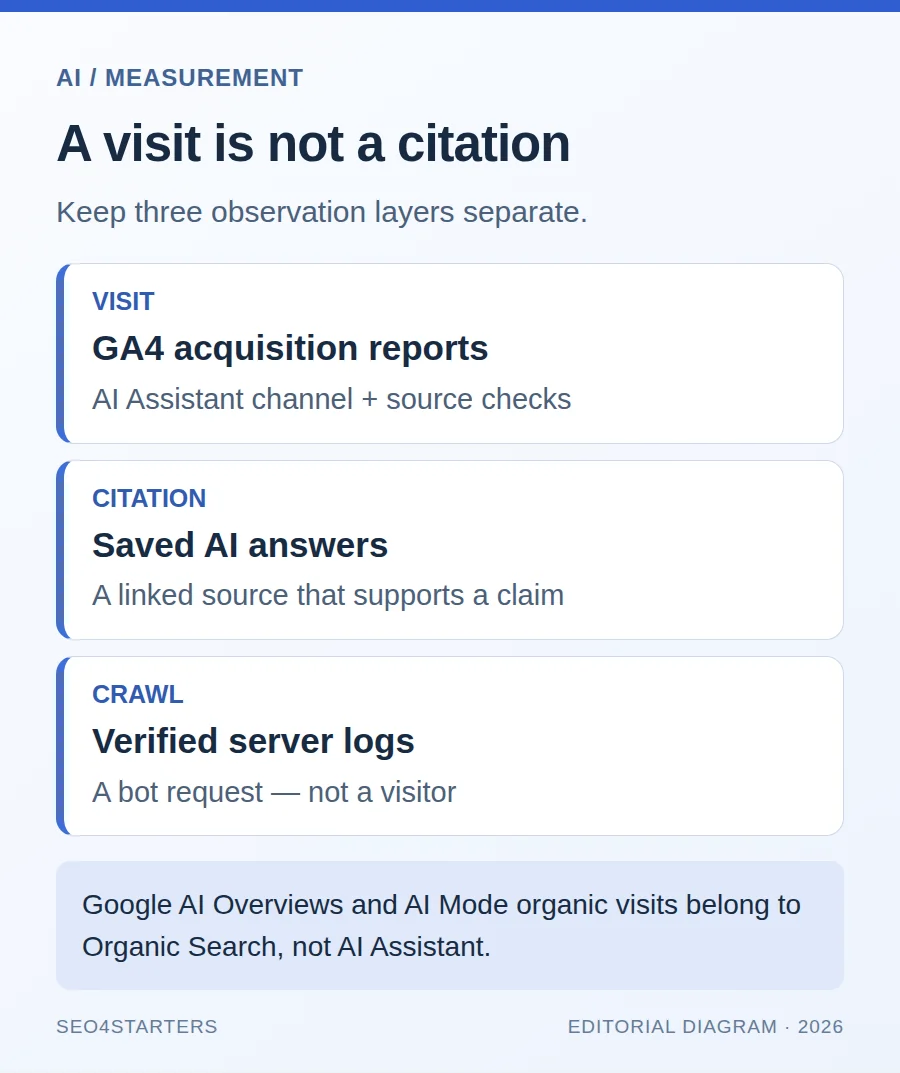
What this does — and does not — measure
| Signal | Where to inspect it | What it can establish |
|---|---|---|
| Assistant-referred visit | GA4 acquisition | A measured visit attributed to a recognized or listed source |
| Citation or brand mention | A saved answer and its linked sources | Observed visibility in that answer, not necessarily a click |
| Crawler request | Server logs and verified crawler identity | A request to the server, not an assistant-referred visitor |
| Business outcome | Validated key events and, where appropriate, CRM reconciliation | A measured action under your measurement definitions |
GA4’s Session source / medium dimension does not expose a server User-Agent log. Referrer suppression, consent choices, app behavior and attribution can leave some visits unidentified or attributed differently. Neither a regex nor the built-in channel proves that your page was used to train a model.
For visibility beyond visits, use our AI search citation measurement guide. For outcomes, start with choosing and validating GA4 key-event counting. Keep acquisition, citation checks and conversions as separate layers.
Frequently asked questions
Do I still need regex now that GA4 has AI Assistant?
Not for a basic channel report. Use the built-in channel first; keep regex when you need an explicit custom source definition or to inspect differences.
Why does my GA4 filter reject a copied regex?
Check that you pasted a single line without outer slash delimiters or quotes, selected a regex match type, and used the version for the exact dimension. The displayed separator inside Session source / medium is part of the value.
Can this measure Google AI Overviews separately?
No. Google’s channel definitions include non-ad AI Overviews and AI Mode visits in Organic Search, not AI Assistant. This expression cannot isolate those Google visits.
Does a citation without a click appear in this report?
No. Acquisition reports measure collected traffic, not every answer in which a site was mentioned. Record answer visibility separately.
Sources and maintenance
- Google Analytics release notes: AI Assistant measurement, 13 May 2026.
- Default channel group definitions: AI Assistant versus Organic Search.
- Google Analytics regular expressions.
Editorial note: this update keeps the original page’s copy-and-paste utility, replaces broad substring matching with explicit source rules, and makes GA4’s built-in channel the recommended starting point. Product definitions and source lists can change; verify them against your own report before making a business decision.